Creating a Missed‑Call Follow‑Up Process for Tampa Bay Service Providers
Why Missed Calls Matter for Local Service Providers
For Tampa Bay service businesses such as landscapers, plumbers, HVAC technicians, and cleaning companies, every incoming call is a potential job. When a call goes unanswered, the opportunity can slip away if no action is taken quickly. Customers often move on to the next provider after a single missed call, especially in competitive local markets. Establishing a reliable process to capture those missed calls and initiate a follow‑up helps keep the pipeline full without requiring constant manual monitoring.
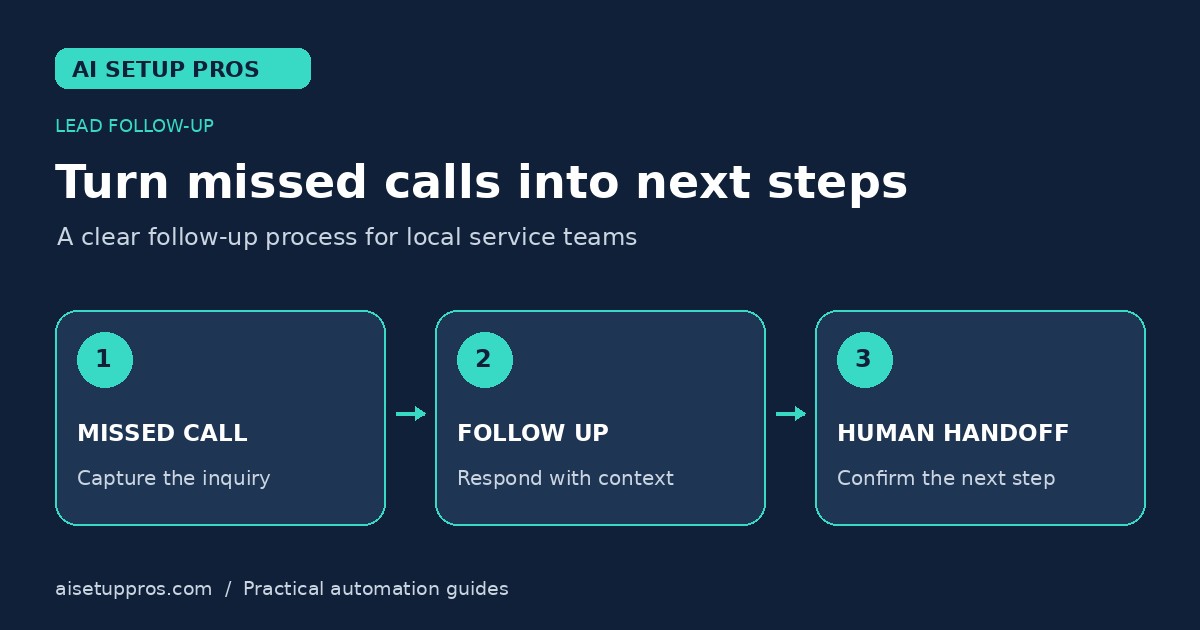
A well‑designed workflow does not need to be complex; it should be repeatable, low‑maintenance, and respectful of the caller’s preferences. By focusing on the essential steps—detecting the missed event, sending a courteous reply, and creating a task for a human to review—you can turn a lost call into a qualified lead while staying compliant with communication regulations.
Core Components of the Follow‑Up Workflow
The workflow consists of four basic building blocks: (1) detection of a missed call, (2) an automated acknowledgment message, (3) creation of a follow‑up task or lead record, and (4) a timeout or escalation path if the lead does not respond. Each block can be implemented with common small‑business tools such as a VoIP phone system, an SMS gateway, and a CRM or task‑management app.
Detection relies on the phone system’s ability to flag calls that end without voicemail or agent interaction. The acknowledgment message is typically a short text that thanks the caller, lets them know you saw the call, and offers a convenient way to reply. The task or record captures the caller’s information, timestamps the interaction, and assigns responsibility. Finally, a timeout—often 24 to 48 hours—triggers a reminder for a human to call back or mark the lead as cold if there is no response.
Setting Up the Automated Trigger
Start by configuring your phone service to send a webhook or email notification whenever a call is missed. Many VoIP providers offer a “missed call alert” feature that can forward details such as caller ID, time, and duration to an external endpoint. If your system does not support webhooks, you can use a simple email filter that forwards the alert to an automation platform.
The automation platform receives the alert and initiates the next steps. Because you are not specifying any particular vendor, think of the platform as a generic workflow engine that can listen for incoming data, run a sequence of actions, and pause for delays. Ensure the connection is secure (e.g., using HTTPS or authenticated email) to protect the caller’s phone number from exposure.
Designing the Follow‑Up Message
The acknowledgment SMS should be concise, friendly, and action‑oriented. A typical template might read: “Hi [First Name], we missed your call. Reply TEXT to schedule a service or call us back at (813) 555‑1234. Reply STOP to opt out.” Personalization is limited to the caller’s first name if available; otherwise, use a generic greeting.
Timing matters. Send the message within a few minutes of the missed call to capitalize on the caller’s recent interest. Include a clear opt‑out mechanism (e.g., “Reply STOP”) to satisfy telecommunication regulations and respect the recipient’s preferences. Avoid sending multiple messages in quick succession; a single follow‑up is usually sufficient unless the caller engages.
Keep the content neutral and avoid making promises about pricing or availability that could change. The goal is to open a channel for conversation, not to close a sale automatically.
Integrating with a CRM or Task Manager
Once the acknowledgment message is sent, create a record in your CRM or a task in your task‑management tool. Populate fields with the caller’s phone number, timestamp, and any notes from the voicemail if one was left. Assign the record to the appropriate team member or service technician based on geography or specialty.
Set a reminder or due date for the follow‑up call, typically within 24 hours. If the caller replies to the SMS, update the record with their response and move the lead to an active sales pipeline. If there is no response after the timeout, the automation can either mark the record as “cold” for later review or trigger a second, softer reminder (e.g., an email) before finalizing.
Human Oversight and Privacy Precautions
Automation handles the repetitive steps, but a person should review each missed‑call record at least once per day. This oversight ensures that messages are delivered correctly, that opt‑out requests are honored promptly, and that any nuanced situations (e.g., a caller with an urgent emergency) receive immediate attention.
From a privacy standpoint, treat the caller’s phone number as personal data. Store it only in systems you control, limit access to authorized staff, and delete records after a defined retention period if they never convert into a job. Do not share the number with third‑party marketing lists without explicit consent. Providing a clear opt‑out in every message helps maintain compliance with regulations such as the TCPA and Florida’s telemarketing statutes.
Limitations, Maintenance, and Continuous Improvement
No workflow is foolproof. Missed‑call detection can fail if the caller hangs up before the system registers the call, or if the phone service experiences downtime. Periodically test the trigger by placing a test call and verifying that the automation fires as expected.
Message fatigue is a risk if the same template is used repeatedly for the same number. Monitor opt‑out rates and adjust timing or content if you notice an increase. Keep the workflow documentation up to date so that new team members can understand the process and make adjustments without breaking the automation.
Finally, treat the workflow as a living process. Review performance metrics such as the percentage of missed calls that lead to a returned call or a scheduled job, and refine the steps based on what you learn. Over time, this iterative approach helps Tampa Bay service businesses capture more opportunities while maintaining a respectful, compliant communication experience.
Explore more small-business automation guides.
Plan your next step
Want help designing a workflow for your Tampa Bay business? Contact AI Setup Pros for a free AI strategy audit.